Spectral Synthesis
This tutorial shows how compute transmission, emission, or eclipse
spectra with Pyrat Bay.
Configuration File
To compute spectra, use a configuration file with the runmode key
set to spectrum. Spectrum runs also require a logfile key,
which sets the name of the output log and spectrum files.
Observing Geometry
The rt_path key sets the radiative-transfer scheme and observing
geometry to use. These are the options:
Observing geometry |
|
Output spectrum |
Comments |
|---|---|---|---|
Transmission |
|
(\(R_{\rm p}\)/\(R_{\rm s}\))2 |
Transmission spectrum |
Eclipse |
|
\(F_{\rm p}\)/\(F_{\rm s}\) |
Occultation spectrum |
Eclipse |
|
\(F_{\rm p}\)/\(F_{\rm s}\) |
Appendix B of [Heng2014] |
Emission |
|
\(F_{\rm p}\) (erg s⁻¹ cm⁻² cm) |
Flux at the planet’s surface |
Emission |
|
\(F_{\rm p}\) (erg s⁻¹ cm⁻² cm) |
Appendix B of [Heng2014] |
Emission |
|
\(F_{\rm p}\) (W m⁻² μm⁻¹) |
Flux measured at Earth |
Here is a sample configuration file to compute a transmission spectrum:
[pyrat]

# Pyrat Bay run mode [tli atmosphere spectrum radeq opacity retrieval]
runmode = spectrum

# Output files
logfile = transmission_spectrum_tutorial.log

# Radiative-transer observing geometry, select from: [transit emission]
rt_path = transit

# Wavelength sampling:
wl_low  = 0.3 um
wl_high = 5.0 um

# System parameters:
rstar = 1.27 rsun
tstar = 5800.0
smaxis = 0.045 au
mplanet = 0.6 mjup
rplanet = 1.0 rjup
# Reference pressure level at rplanet:
refpressure = 0.1 bar

# Atmospheric model:
ptop = 1.0e-8 bar
pbottom = 100.0 bar
nlayers = 81

# Temperature profile [isothermal guillot madhu]
tmodel = isothermal
tpars = 850.0

# Chemistry model [free equilibrium]
chemistry = free
species =       H2    He   Na  H2O  CH4   CO  CO2  NH3  HCN   N2
uniform_vmr = 0.85 0.149 5e-6 2e-3 1e-4 5e-4 1e-6 1e-5 1e-9 2e-4

# Radius-profile model [hydro_m hydro_g]
radmodel = hydro_m


# Line-sampled cross sections
sampled_cross_sec =
    cross_section_0.15-33.0um_0200-5000K_R025K_H2O_exomol_pokazatel.npz

# Continuum cross-section files:
continuum_cross_sec =
    {ROOT}/pyratbay/data/CIA/CIA_Borysow_H2H2_0060-7000K_0.6-500um.dat
    {ROOT}/pyratbay/data/CIA/CIA_Borysow_H2He_0050-3000K_0.3-030um.dat

# Alkali models, select from: [sodium_vdw potassium_vdw]
alkali = sodium_vdw

# Rayleigh models, select from: [rayleigh_H rayleigh_He rayleigh_H2]
rayleigh =
    rayleigh_H2
    rayleigh_He

# Cloud models, select from: [lecavelier deck ccsgray]
clouds =
    deck       -0.5
    lecavelier  0.0 -4.0

# Verbosity level (<0:errors, 0:warnings, 1:headlines, 2:details, 3:debug):
verb = 2

# If defined, plot x-axis in log scale and set ticks at logxticks locations:
logxticks = 0.3 0.5 0.7 1.0 2.0 3.0 5.0
The output spectrum can be set with the specfile key, otherwise it
is taken from the logfile name (replacing the .log file
extension with .dat)
System parameters
The system parameters have multiple uses.
Hill radius
The mstar, mplanet, and smaxis keys set the stellar mass,
planetary mass, and orbital semi-major axis. If these keys are set in
the configuration file, the code will compute the planetary Hill
radius (\(R_{\rm H} = a \sqrt[3]{M_{\rm p}/3M_{\rm s}}\)). In
such case, Pyrat Bay will neglect atmospheric layers at altitudes
larger than \(R_{\rm H}\), since they should not be
gravitationally bound to the planet.
Radius ratio
To compute eclipse depths from the emission spectra (\(F_{\rm p}\)), the user
needs to set the rstar and rplanet keys, which define the
stellar and planetary radius. The eclipse depths can then be computed as:
The tstar key sets the stellar effective temperature, which can be
used to define a stellar blackbody spectrum (\(F_{\rm s}\), see starspec).
Stellar Spectrum
The stellar spectrum is required to compute eclipse depths as the
planet-to-star flux spectrum (for transit calculations, a stellar
spectrum is not required). Pyrat Bay provides several options to
set a stellar spectrum.
Users can use their own custom stellar spectra via the
starspec argument. This must point to a plain file file
containing a spectrum in two columns: the first column has the
wavelength array in microns, the second column has the flux
spectrum in erg s-1 cm-2 cm units.
# Custom stellar spectrum file
starspec = inputs/WASP18_spectrum.dat
Users can use a Kurucz stellar model [Castelli2003] via the
kurucz argument of the configuration file, pointing to a
Kurucz model. These models can be downloaded from this link. The code selects the
correct Kurucz model based on the stellar temperature and surface
gravity values:
# Kurucz stellar spectrum
tstar = 5700
log_gstar = 4.5
kurucz = inputs/fp00k2odfnew.pck
By defining the stellar effective temperature tstar, the code
will adopt a blackbody spectrum for the star (unless the
starspec or kurucz arguments have been set).
# Stellar effective temperature (K)
tstar = 5700
Atmosphere Model
There are four main atmospheric properties to consider (computed in this order): the pressure profile, the temperature, the volume mixing ratios (VMRs), and the radius profile.
These properties can (a) be read from an input file (atmfile),
(b) be computed from parametric models, or (c) be calculated from a
mix of them. The rules are simple:
if there is an input atmosphere file, read properties from file
if a model and its parameters are defined, the property will be calculculated from the model (overwritting a )
The atmfile key sets the input atmospheric model from which
to compute the spectrum. If the file pointed by atmfile does
not exist, the codel will attempt to produce it (provided all
necessary input parameters are set in the configuration file).
The atmospheric model can be produced with Pyrat Bay or be a
custom input from the user.
# Input atmospheric profile
atmfile = wasp80b_custom_profile.atm
See these sections to compute atmospheric profiles from models:
TBD
Spectrum sampling
The wl_low and wl_high keys set the wavelength boundaries for
the output spectrum (values must contain units; otherwise, set the
units with the wlunits key).
The wnstep sets the sampling rate in cm-1. Note that this
will be the output sampling rate. Internally, Pyrat Bay must
compute line profiles at a higher resolution to ensure not to
undersample the line profiles. The wnosamp key (an integer) sets
the oversampling factor of the high-resolution sampling relative to
wnstep (that is, the high-resolution sampling rate is
wnstep/wnosamp). Typical values for the optical/IR are wnstep =
1.0 and wnosamp = 2000.
Alternatively, the user can request a constant-resolution output by
setting the resolution key (where the resolution is
\(R=\lambda/\Delta\lambda\)).
Cross sections
See the following sections for available cross sections:
Flux dilution factor
Set the f_dilution argument to set an flux dilution factor
[Taylor2020], with values between 0–1, which compensates for
emission from an inhomogeneous atmosphere. The dilution factor
represents the fractional area of the hottest region on the planet
(assuming that the colder regions flux is negligible in comparison).
# Flux dilution factor, value between [0--1]:
f_dilution = 0.85
Observations
Use the data and uncert keys to set values for observed
transit- or eclipse-depth values and their uncertainties,
respectively. Logically, you want to set data values corresponding to
the filters pass-bands.
Use the dunits key to specify the units of the data and
uncert values (default: dunits = none). Typical values are:
‘none’, ‘percent’, or ‘ppm’ (see Units section).
Note
Note that the filters, data, and uncert keys are
not strictly required for a spectrum run, but they will
allow the code to plot these information if requested (see
[link to plots]).
Filter Pass-bands
Use the filters key to set the path to instrument filter
pass-bands (see [link to formats?]). These can be used to compute
band-integrated values for the transmission or eclipse-depth spectra.
Fitting parameters
Number of CPUs
The ncpu key sets the number of CPUs to use when computing LBL
opacities or when running retrievals (default: ncpu = 1).
Verbosity
The verb key sets the screen-output and logfile verbosity level.
Higher verb values will display increasingly levels of detail
according to the following table:
|
Screen Outputs |
|---|---|
<0 |
Errors |
0 |
Warnings |
1 |
Headlines |
2 |
Details |
3 |
Debug |
Plane-parallel Hemispheric Integration
For eclipse geometry, the code computes the emergent intensity under
the plane-parallel approximation, and then it integrates (sums)
intensity spectra at different angles with respect to the normal to
model the emitted flux spectrum. The raygrid sets the angles (in
degrees) where to evaluate these intensities (default: raygrid = 0
20 40 60 80). The user can set custom values for these angles as
long as: (1) the first value is zero (normal to the planet’s
‘surface’), (2) they lie in the [0,90) range, and (3) they are
increasing order.
Alternatively, the user can set the quadrature key to perform a
Gaussian-quadrature integration, where the quadrature value sets
number of Gaussian-quadrature points (in which case, raygrid will
be ignored).
Examples
Note
Before running this example, make sure that you have generated the TLI file from the tli_tutorial_example, generated the atmospheric profiles from the abundance_tutorial_example, and download the configuration file shown above, e.g., with these shell commands:
tutorial_path=https://raw.githubusercontent.com/pcubillos/pyratbay/master/examples/tutorial
wget https://zenodo.org/records/16965391/files/cross_section_0.15-33.0um_0200-5000K_R025K_H2O_exomol_pokazatel.npz
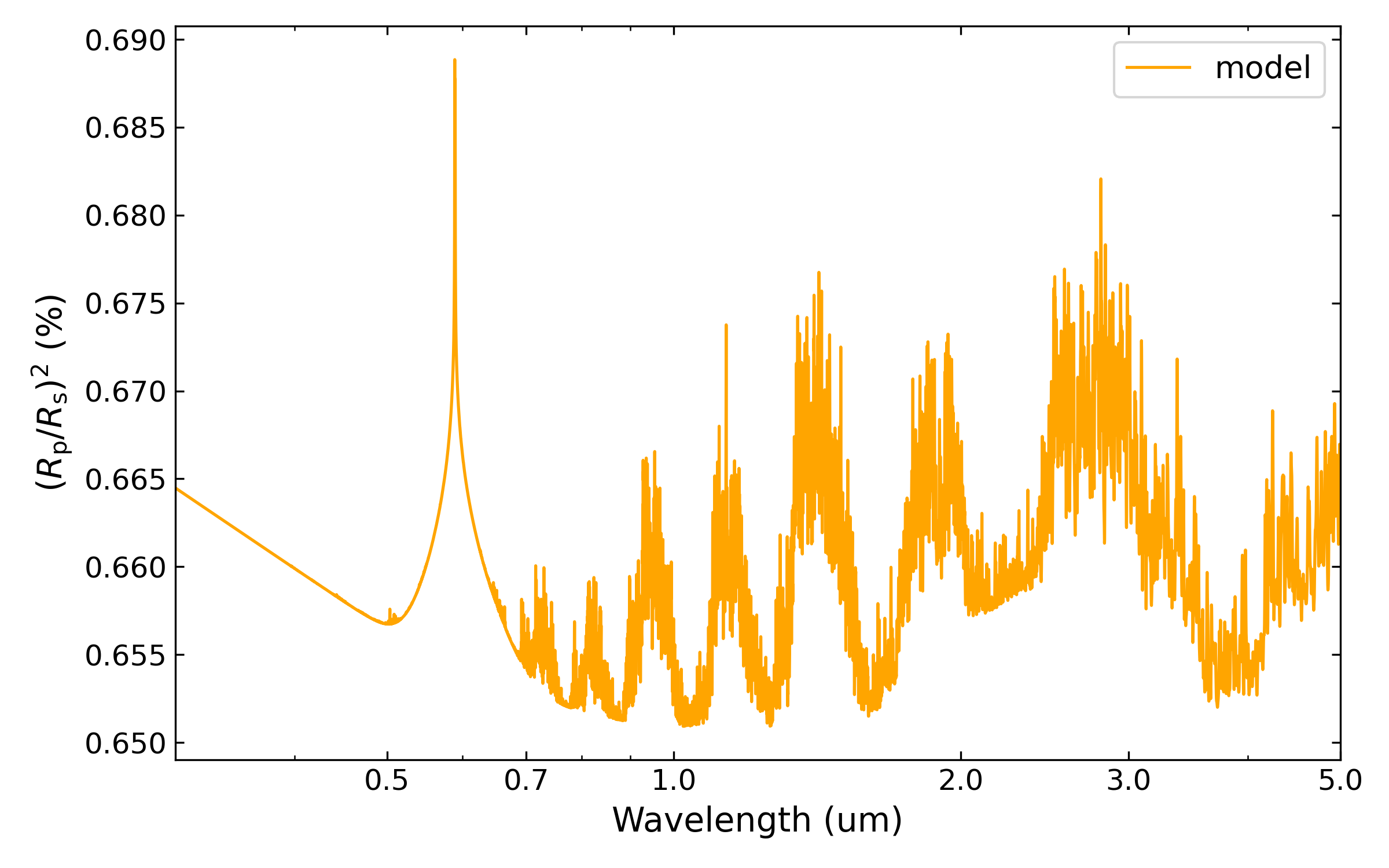
In an interactive run, a spectrum run returns a ‘pyrat’ object that contains all input, intermediate, and output variables used to compute the spectrum. The following Python script computes and plots a transmission spectrum using the configuration file found at the top of this tutorial:
import matplotlib.pyplot as plt
plt.ion()

import pyratbay as pb
import pyratbay.constants as pc

pyrat = pb.run('spectrum_transmission.cfg')

# Plot the resulting spectrum:
wl = 1.0 / (pyrat.spec.wn*pc.um)
depth = pyrat.spec.spectrum / pc.percent
wl_ticks = [0.3, 0.5, 0.7, 1.0, 2.0, 3.0, 5.0]

plt.figure(-3, (7,4))
plt.clf()
ax = plt.subplot(111)
plt.semilogx(wl, depth, "-", color='orange', lw=1.0)
ax.get_xaxis().set_major_formatter(matplotlib.ticker.ScalarFormatter())
ax.set_xticks(wl_ticks)
plt.xlim(0.3, 5.0)
plt.ylabel("Transit depth (Rp/Rs)$^2$ (%)")
plt.xlabel("Wavelength (um)")

# Or, alternatively:
ax = pyrat.plot_spectrum()
And the results should look like this:
Note
Note that although the user can define most input units, nearly all variables are stored in CGS units in the ‘pyrat’ object.
The ‘pyrat’ object is modular, and implements several convenience methods to plot and display its content, as in the following example:
# pyrat object's string representation:
print(pyrat)

# String representation of the spectral variables:
print(pyrat.spec)