ExoMol line sampling
This tutorial shows how to fetch ExoMol line lists, and sample them
into cross-section files for use in Pyrat Bay radiative-transfer
calculations.
Pyrat Bay has a two-step process to process line lists:
Convert line lists from their original format (ExoMol
.states/.transfiles) into transition-line information files (TLI files). This is simple a re-formatting step, the data is still kept as the info per line-transition (wavelengths, gf, Elow, isotope). TLI files can readily be used forPyrat Bayradiative-transfer calculations, but such runs are slow as the code computes the lines shape and strength on the fly to obtain the cross sections.Conver TLI files into cross-section tables (saved as Numpy
.npzfiles). This step evaluates (i.e., samples) the line-transition information over a grid of [wavelength, temperature, pressure], which involves computing the line shape and strength of all lines at each given wl, pressure, and temperature value of the grid. Cross-section tables are ideal for radiative-transfer calculations, since the code simply interpolates from them (and therefore, these calculations are fast).
The main issue with cross-section is that they are not too flexible (one
might want to change, e.g., the wavelength resolution or line broadening
parameters, for which the user would need to re-generate cross-sections
from the TLI files). For this reason Pyrat Bay was designed with
this two-step approach.
Download ExoMol data
You can find HITRAN and HITEMP line lists from their website:
There are 3 types of files to fetch, the .trans files, the
.states files, and the .pf files. For this demo, we will get
those for the HCN line lists. We can do this with the following prompt
commands:
# Download the data
wget https://www.exomol.com/db/HCN/1H-12C-14N/Harris/1H-12C-14N__Harris.states.bz2
wget https://www.exomol.com/db/HCN/1H-12C-14N/Harris/1H-12C-14N__Harris.trans.bz2
wget https://www.exomol.com/db/HCN/1H-12C-14N/Harris/1H-12C-14N__Harris.pf

wget https://www.exomol.com/db/HCN/1H-13C-14N/Larner/1H-13C-14N__Larner.states.bz2
wget https://www.exomol.com/db/HCN/1H-13C-14N/Larner/1H-13C-14N__Larner.trans.bz2
wget https://www.exomol.com/db/HCN/1H-13C-14N/Larner/1H-13C-14N__Larner.pf

# Unzip the data
bzip2 -d *.bz2
Format the partition function
Before generating the TLI file, we will format the partition-function
files from ExoMol for use in Pyrat Bay. We can do this with the
following prompt command where we first specify the source (exomol)
and then list all ‘.pf’ files of interest (one can combine multiple
isotopologues of a species into a single file):
If the ExoMol .pf files sample the temperature range of interest. Then use their .pf files directly:
pbay -pf exomol 1H-12C-14N__Harris.pf 1H-13C-14N__Larner.pf
If you expect to probe higher temperatures than those sample in the .pf files, the we can compute the partitions from the .states files with the command below. Here one specifies the temperature ranges and sampling step.
#             T_low  T_high  delta_T
pbay -pf states 5.0  6000.0  5.0 \
    1H-12C-14N__Harris.states \
    1H-13C-14N__Larner.states
This will produce the PF_exomol_HCN.dat file, which can be passed as input for the TLI config file.
Compute TLI files
The easiest way to generate TLI files is via configuration files and the
command line. The config file below
(tli_exomol_HCN_cookbook.cfg)
converts the ExoMol/HCN line-lists (see dblist) into a TLI file (see
tlifile or logfile).
Partition-function information must also be provided (see pflist).
As in this demo (see above), this is the path to a partition-function
file (either a unique PF file for all dblist files, or one PF file
for each dblist file). Alternatively, one can set pflist=tips to
use the partition functions from [Gamache2017] [Gamache2021].
Lastly, the user can specify the wavelength range of the extracted data
(see wl_low and wl_high). Normally one want to the widest possible
range (to avoid needing to re-calculating TLI files if a future
calculation needs it), but for sake of this demo, we will extract just
over a narrow region:
[pyrat]

# Pyrat Bay run mode [tli atmosphere spectrum radeq opacity retrieval]
runmode = tli

# Output log and TLI file (if you ommit `tlifile`, it will be automatically generated from the logfile):
logfile = exomol_HCN_0.3-30.0um.log

# List of line-transtion databases (.trans files):
# (make sure the corresponding .states files are in the same folder)
dblist =
    1H-12C-14N__Harris.trans
    1H-13C-14N__Larner.trans

# Type of line-transition database, select from:
# [hitran exomol repack]
dbtype = exomol

# List of partition functions for each database:
pflist = PF_exomol_HCN.dat

# Initial and final wavelength:
wl_low = 0.3 um
wl_high = 30.0 um

# Verbosity level [1--3]:
verb = 2
To generate the tli files, we run these Pyrat Bay prompt commands:
pbay -c line_sample_exomol_HCN_tli.cfg
Compute cross-section tables
As with TLI files, cross-section files can be generated via
configuration files and the command line. The config file below
computes a cross-section table (with the output name determined by the
sampled_cross_sec or logfile parameters).
These parameters define each array of the cross-section table:
The
pbottom,ptop, andnlayersparameters define the pressure sampling arrayThe
tmin,tmax, andtstepparameters define the temperature sampling arrayThe
wl_low,wl_high, andresolutionparameters define the spectral array at a constant resolution (alternatively, one can replaceresolutionwithwnstepto sample at constant \(\Delta \text{wavenumber}\), units in cm\(^{-1}\))
For the composition (species), make sure to include the molecule for
which we are computing the cross-sections. Also, include the
background gas, which is relevant for the pressure broadening (here,
we assume a H2/He-dominated atmosphere). Only the VMR values of the
background gasses are important, trace-gas VMRs are irrelevant (see
chemistry or uniform_vmr. tmodel and tpars are needed to
define the atmosphere’s temperature profile, but for an opacity run,
these do not impact the calculations.
The optional voigt_extent and voigt_cutoff keys set the
extent of the profiles wings from the line centers. voigt_extent
sets the maximum extent in units of HWHM (default is 300 HWHM).
voigt_cutoff sets the maximum extent in wavenumber units of cm-1 (default
is 25.0 cm-1). For any given profile, the code truncates the line
wing at the minimum value of either voigt_extent or
voigt_cutoff.
Lastly, the user can set ncpu to speed up the
calculations using parallel computing.
[pyrat]

# Pyrat Bay run mode [tli atmosphere spectrum radeq opacity retrieval]
runmode = opacity

# Output log and cross-section file:
# (if you ommit extfile it will be automatically generated from logfile name)
logfile = cross_section_R025K_0150-3000K_0.3-30.0um_exomol_HCN_harris-larner.log

# Input TLI file:
tlifile = exomol_HCN_0.3-30.0um.tli

# Pressure sampling:
pbottom = 100 bar
ptop = 1e-8 bar
nlayers = 51

# Temperature profile (needed, but not relevant for cross-section generation)
tmodel = isothermal
tpars = 1000.0

# A simplified H2/He-dominated composition
chemistry = free
species = H2  He  HCN
uniform_vmr = 0.85 0.15 1e-4

# Wavelength sampling
wl_low = 0.3 um
wl_high = 30.0 um
resolution = 25000.0

# Line-profile wings extent (in HWHM from center):
voigt_extent = 300.0

# Cross-section temperature sampling:
tmin =  150
tmax = 3000
tstep = 150

# Number of CPUs for parallel processing:
ncpu = 16

# Verbosity level [1--3]:
verb = 2
To generate the cross-section files, we run these Pyrat Bay prompt
command:
pbay -c line_sample_exomol_HCN_opacity.cfg
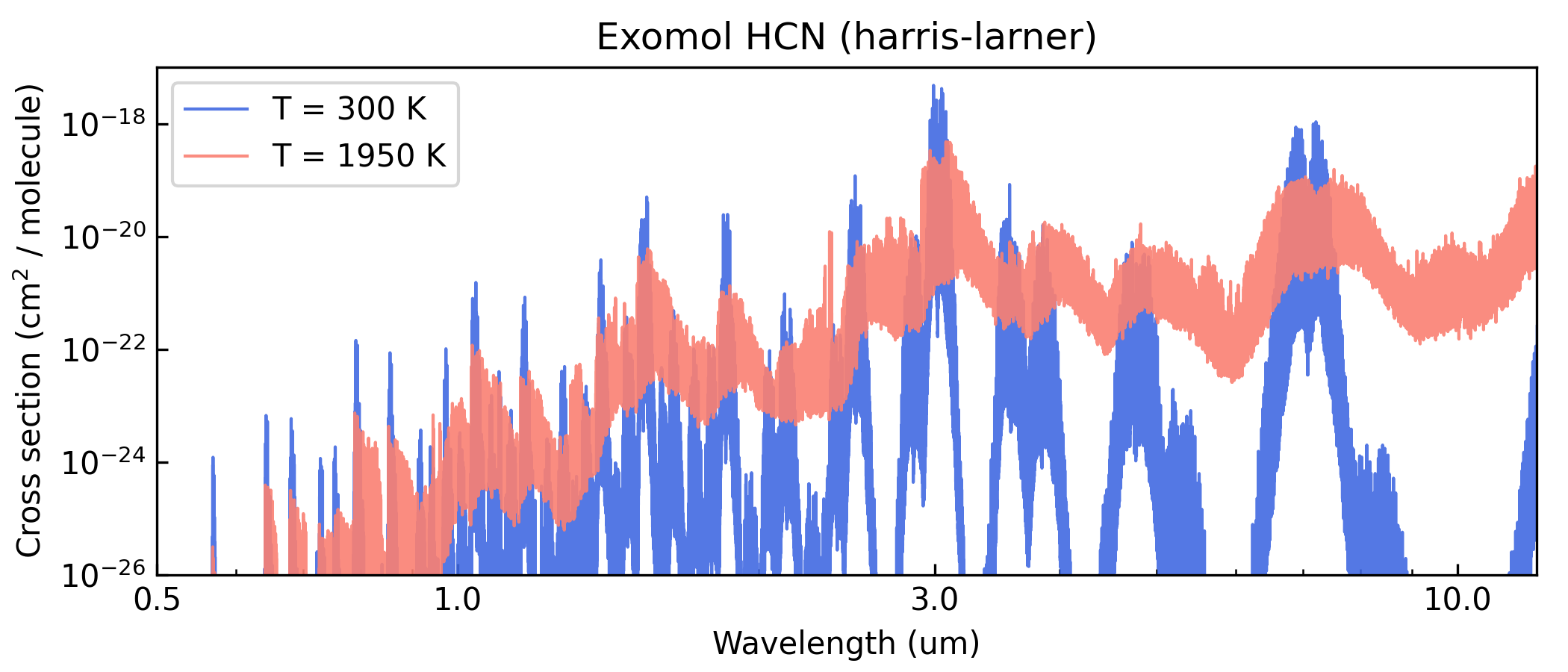
Here’s a Python script to take a look at the output cross section:
import pyratbay.io as io
import matplotlib
import matplotlib.pyplot as plt

cs_file = 'cross_section_R025K_0150-3000K_0.3-30.0um_exomol_HCN_harris-larner.npz'
units, mol, temp, press, wn, cross_section = io.read_opacity(cs_file)

p = 35
wl = 1e4/wn
colors = 'royalblue', 'salmon'

fig = plt.figure(0)
plt.clf()
fig.set_size_inches(7, 3)
plt.subplots_adjust(0.1, 0.145, 0.98, 0.9)
ax = plt.subplot(111)
for i,t in enumerate([1,12]):
    label = f'T = {temp[t]:.0f} K'
    plt.plot(
        wl, cross_section[t,p], lw=1.0,
        color=colors[i], alpha=0.9, label=label,
    )
plt.xscale('log')
plt.yscale('log')
ax.xaxis.set_minor_formatter(matplotlib.ticker.NullFormatter())
ax.xaxis.set_major_formatter(matplotlib.ticker.ScalarFormatter())
ax.set_xticks([0.5, 1.0, 3.0, 10.0])
plt.xlim(0.5, 12.0)
plt.ylim(1e-26, 1e-17)
plt.title('Exomol HCN (harris-larner)')
plt.xlabel('Wavelength (um)')
plt.ylabel(r'Cross section (cm$^{2}$ / molecule)')
plt.legend(loc='upper left')
ax.tick_params(which='both', direction='in')
Concluding remarks
This script uses a relatively small line-list data set (70 million
transitions). In many other cases the ExoMol line lists reach the
billions of line transitions, for which computing cross-section spectra
becomes computationally unfeasible. For such cases, the repack tool
(Cubillos
2017) helps
to identify and retain the strong line transitions that dominate the
spectrum. repack effectively the line list down to millions, without
significantly impacting the cross section spectra. The Repack line sampling tutorial shows how to use repack-processed ExoMol data in Pyrat Bay.