Getting Started
Pyrat Bay is a multi-purpose package that enables the modeling of
exoplanet atmospheres and their spectra [CubillosBlecic2021]. These
can involve several different physical processes. The following table
summarizes the modeling capabilities enabled by Pyrat Bay:
Calculation |
Description |
Outputs |
|---|---|---|
Sample line-transition data (Exomol, HITEMP) into cross-section spectra at a fixed grid of pressures, temperatures, and wavenumbers |
Cross sections tables |
|
Compute 1D temperature, volume-mixing ratios, and radius profiles of a planetary atmosphere as function of pressure |
Atmospheric \(T(p)\), \({\rm VMR}(p)\), and \(r(p)\) profiles |
|
Radiative-transfer calculations given an input exoplanet atmosphere |
Transit-depth, eclipse-depth, and/or emission spectra |
|
Given an exoplanet parametric model and a spectroscopic observation, infer the exoplanet atmospheric properties |
Posterior distribution of planetary model parameters |
|
radiative_equilibrium |
Radiative-transfer calculations across an exoplanet atmosphere |
Equilibrium \(T(p)\) and \({\rm VMR}(p)\), emission spectra |
Any of these steps can be run from the command line or interactively
(though the Python Interpreter or a Jupyter Notebook). To streamline
execution, Pyrat Bay provides a single command to execute any of
these runs. To set up any of these runs, Pyrat Bay uses
configuration files following the standard INI format.
The Quick Example section below demonstrates a simple
forward-modeling spectrum run. The following sections provide a
detailed for each of the running modes. Finally, most of the low- and
mid-level routines used for these calculations are available
through the Pyrat Bay sub modules (see API).
Installation
To install Pyrat Bay run the following command from the terminal:
pip install pyratbay
Alternatively (e.g., for developers), clone the repository to your local machine with the following terminal commands:
git clone https://github.com/pcubillos/pyratbay
cd pyratbay
pip install -e .
Pyrat Bay (version 2.0+) has been extensively tested to work on
Unix/Linux and OS X machines and is available for Python 3.9+.
Quick Example
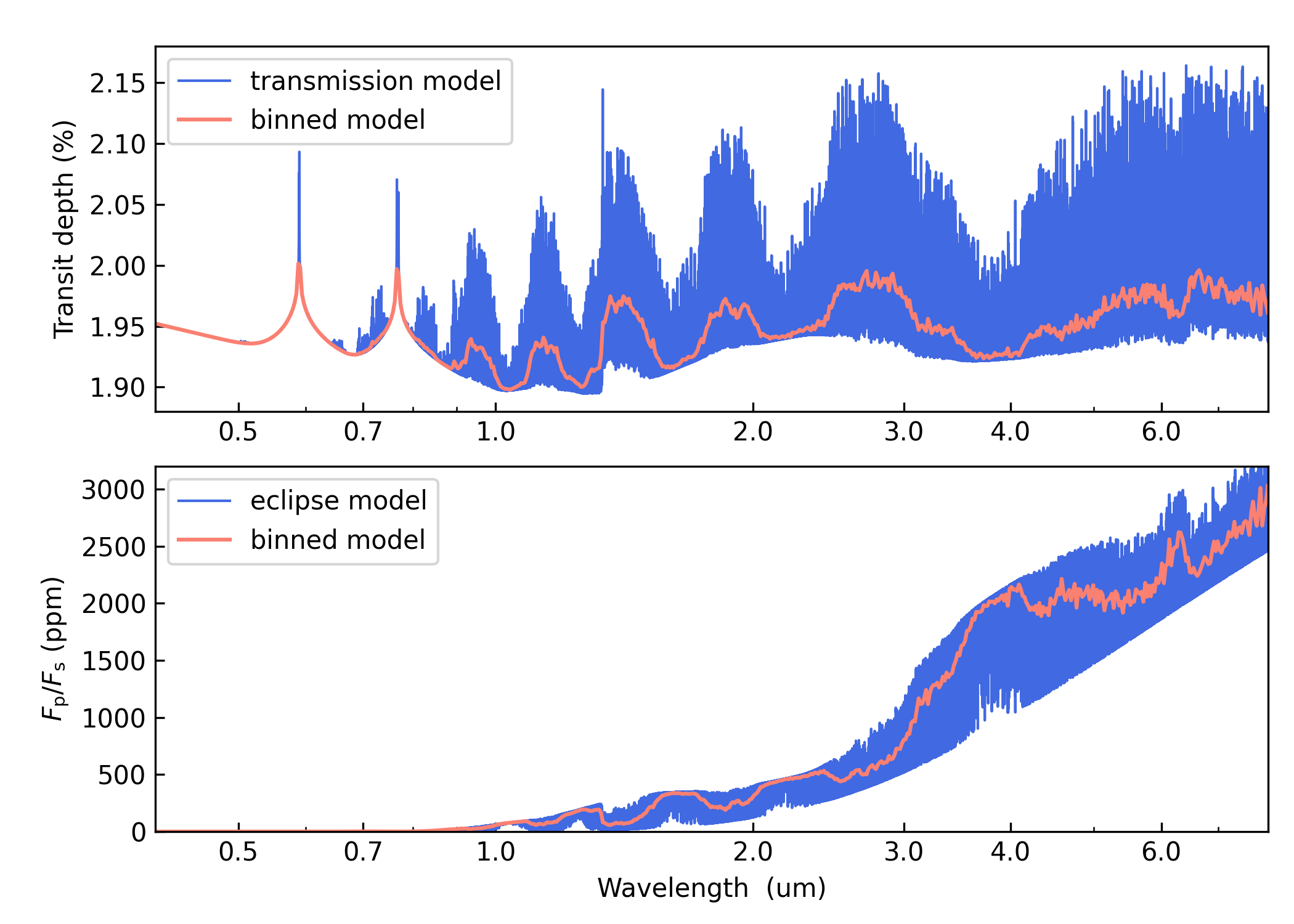
The following command-line scripts show how to calculate transmission and eclipse spectra for an exoplanet atmosphere between 0.4 and 8.0 um. First, create a directory to place input and output files, e.g.:
mkdir run_demo
cd run_demo
Download the H2O line-list database from the HITRAN server and unzip it:
# Download HITRAN H2O line list
wget https://www.cfa.harvard.edu/HITRAN/HITRAN2012/HITRAN2012/By-Molecule/Compressed-files/01_hit12.zip
unzip 01_hit12.zip
Now download the Pyrat Bay configuration files here below:
Click here to show/hide: tutorial_tli_hitran_H2O.cfg
[pyrat]

# Pyrat Bay run mode: [tli atmosphere spectrum opacity retrieval radeq]
runmode = tli

# Output log and TLI file:
logfile = ./HITRAN_H2O_0.4-8.0um.log

# List of line-transtion databases:
dblist = ./01_hit12.par

# Type of line-transition database, select from:
# [hitran exomol repack]
dbtype = hitran

# List of partition functions for each database:
pflist = tips

# Initial and final wavelength:
wl_low  = 0.4 um
wl_high = 8.0 um

# Verbosity level (<0:errors, 0:warnings, 1:headlines, 2:details, 3:debug):
verb = 2
Click here to show/hide: tutorial_spectrum_transmission.cfg
[pyrat]

# Pyrat Bay run mode: [tli atmosphere spectrum opacity retrieval radeq]
runmode = spectrum

# Output spectrum file:
logfile = ./transmission_spectrum_tutorial.log

# Radiative-transer geometry, select from
# [transit eclipse eclipse_two_stream emission emission_two_stream f_lambda]
rt_path = transit

# Atmospheric model:
ptop = 1e-7 bar
pbottom = 100 bar
nlayers = 81

tmodel = guillot
tpars = -5.4  -0.68  0.0  0.0  1240.0  100.0

chemistry = free
species = H2   He    H2O  Na   K
uniform_vmr = 0.85 0.145 1e-4 1e-6 1e-7

# Spectrum boundaries, sampling rate, and oversampling factor:
wl_low  = 0.4 um
wl_high = 8.0 um
resolution = 25_000

# System parameters:
rstar   = 1.0 rsun
rplanet = 1.35 rjup
mplanet = 0.70 mjup
refpressure = 0.1 bar

# Line-by-line opacities:
tlifile = ./HITRAN_H2O_0.4-8.0um.tli

# Continuum cross-section files:
continuum_cross_sec =
    {ROOT}/pyratbay/data/CIA/CIA_Borysow_H2H2_0060-7000K_0.6-500um.dat
    {ROOT}/pyratbay/data/CIA/CIA_Borysow_H2He_1000-7000K_0.5-400um.dat

# Radius-profile model, select from: [hydro_m hydro_g]
radmodel = hydro_m

# Cloud models: [lecavelier deck]
clouds = lecavelier 0.0 -4.0

# Alkali models, select from: [sodium_vdw potassium_vdw]
alkali = sodium_vdw potassium_vdw

# Number of parallel processors:
ncpu = 7

# Verbosity level (<0:errors, 0:warnings, 1:headlines, 2:details, 3:debug):
verb = 2
Click here to show/hide: tutorial_spectrum_eclipse.cfg
[pyrat]

# Pyrat Bay run mode: [tli atmosphere spectrum opacity retrieval radeq]
runmode = spectrum

# Output spectrum file:
logfile = ./eclipse_spectrum_tutorial.log

# Radiative-transer geometry, select from
# [transit eclipse eclipse_two_stream emission emission_two_stream f_lambda]
rt_path = eclipse

# Atmospheric model:
ptop = 1e-7 bar
pbottom = 100 bar
nlayers = 81

tmodel = guillot
tpars = -5.4  -0.68  0.0  0.0  1240.0  100.0

chemistry = free
species = H2   He    H2O  Na   K
uniform_vmr = 0.85 0.145 1e-4 1e-6 1e-7

# Spectrum boundaries, sampling rate, and oversampling factor:
wl_low  = 0.4 um
wl_high = 8.0 um
resolution = 25_000

# System parameters:
rstar = 1.0 rsun
tstar = 4200
rplanet = 1.35 rjup
mplanet = 0.70 mjup
refpressure = 0.1 bar

# Line-by-line opacities:
tlifile = ./HITRAN_H2O_0.4-8.0um.tli

# Continuum cross-section files:
continuum_cross_sec =
    {ROOT}/pyratbay/data/CIA/CIA_Borysow_H2H2_0060-7000K_0.6-500um.dat
    {ROOT}/pyratbay/data/CIA/CIA_Borysow_H2He_1000-7000K_0.5-400um.dat

# Radius-profile model, select from: [hydro_m hydro_g]
radmodel = hydro_m

# Cloud models: [lecavelier deck]
clouds = lecavelier 0.0 -4.0

# Alkali models, select from: [sodium_vdw potassium_vdw]
alkali = sodium_vdw potassium_vdw

# Number of parallel processors:
ncpu = 7

# Verbosity level (<0:errors, 0:warnings, 1:headlines, 2:details, 3:debug):
verb = 2
Execute these commands from the shell to create a Transition-Line-Information file for H₂O, and then to use it to compute transmission and emission spectra:
# Format line-by-line opacity:
pbay -c tutorial_tli_hitran_H2O.cfg

# Compute transmission and emission spectra:
pbay -c tutorial_spectrum_transmission.cfg
pbay -c tutorial_spectrum_eclipse.cfg
Outputs
That’s it, now let’s see the results. The screen outputs and any
warnings raised are saved into log files. The output spectrum is
saved to a separate file, to see it, run this Python script (on
interactive mode, I suggest starting the session with ipython
--pylab):
import pyratbay as pb
import pyratbay.constants as pc
import pyratbay.spectrum as ps
import pyratbay.io as io
import matplotlib
import matplotlib.pyplot as plt
plt.ion()


wl, transmission = io.read_spectrum("transmission_spectrum_tutorial.dat", wn=False)
wl, eclipse = io.read_spectrum("eclipse_spectrum_tutorial.dat", wn=False)

bin_wl = ps.constant_resolution_spectrum(0.4, 8.0, resolution=200)
bin_transit = ps.bin_spectrum(bin_wl, wl, transmission)
bin_eclipse = ps.bin_spectrum(bin_wl, wl, eclipse)

fig = plt.figure(0)
plt.clf()
fig.set_size_inches(7,5)
plt.subplots_adjust(0.12, 0.1, 0.98, 0.95, hspace=0.15)
ax = plt.subplot(211)
plt.plot(wl, transmission/pc.percent, color="royalblue", label="transmission model", lw=1.0)
plt.plot(bin_wl, bin_transit/pc.percent, "salmon", lw=1.5, label='binned model')
plt.xscale('log')
plt.ylabel('Transit depth (%)')
ax.get_xaxis().set_major_formatter(matplotlib.ticker.ScalarFormatter())
ax.set_xticks([0.5, 0.7, 1.0, 2.0, 3.0, 4.0, 6.0])
ax.tick_params(which='both', direction='in')
plt.xlim(0.4, 8.0)
plt.ylim(1.88, 2.18)
plt.legend(loc="upper left")

ax = plt.subplot(212)
plt.plot(wl, eclipse/pc.ppm, "royalblue", label="eclipse model", lw=1.0)
plt.plot(bin_wl, bin_eclipse/pc.ppm, "salmon", lw=1.5, label='binned model')
plt.xscale('log')
plt.xlabel(r"Wavelength  (um)")
plt.ylabel(r"$F_{\rm p}/F_{\rm s}$ (ppm)")
ax.get_xaxis().set_major_formatter(matplotlib.ticker.ScalarFormatter())
ax.set_xticks([0.5, 0.7, 1.0, 2.0, 3.0, 4.0, 6.0])
ax.tick_params(which='both', direction='in')
plt.xlim(0.4, 8.0)
plt.ylim(0, 3200)
plt.legend(loc="upper left")
plt.draw()
plt.savefig("pyrat_spectrum_demo.png", dpi=300)
The output figure should look like this:
Command-line runs
As shown above, Pyrat Bay enables a command-line entry point to
execute any of the runs listed above:
pbay -c config_file.cfg
The configuration file determines what run mode to execute by setting
the runmode key. Each of these modes have different
required/optional keys, which are detailed in further sections.
This same entry point offers a couple of secondary processes (display version, re-format files). To display these options, run:
pbay -h
Interactive runs
The same process can be executed from the Python Interpreter or in a Jupyter Notebook:
import pyratbay as pb
pyrat = pb.run('tutorial_spectrum_transmission.cfg')
ax = pyrat.plot_spectrum()
The output vary depending on the selected run mode. Additional low- and mid-level routines are also available through this package (see the API).
In the following sections you can find a more detailed description and
examples of how to run Pyrat Bay for each available configuration.